
Okay, this one’s for people who read ebooks using a touchscreen ereader, like a Kobo or a Kindle. It’s also for those who read on devices that don’t have dedicated front/back buttons.
I’m a Kobo user, but this is true for Kindle users as well. Each device lets you configure where the “next page” tap is on the screen. Here’s Kobo’s options:
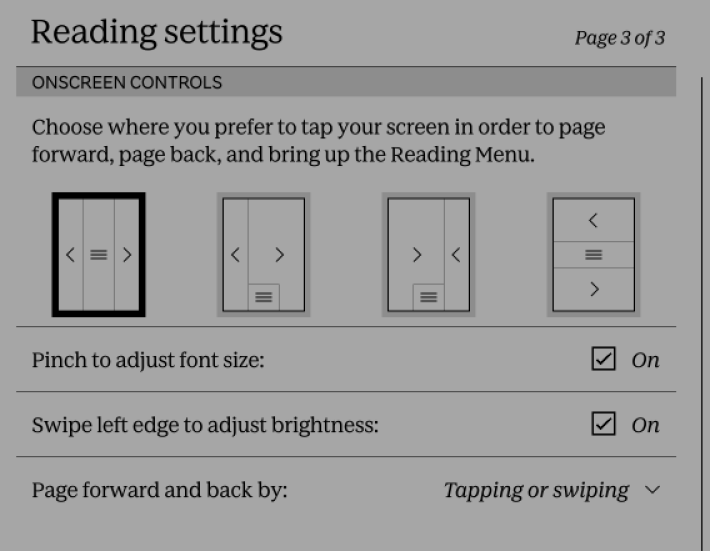
I tend to use the default, or the third one if I switch to holding the device in my left hand. I don’t think any of them are very good.
There’s two design flaws. You can’t swap hands without, and it’s too easy to forget where “previous page” is in relation to “next page.”
I don’t have access to Kobo’s usage stats, but I bet there’s very few people tapping “previous page” very often.
If I could design a legend for how the Kobo would look, it would be like this:
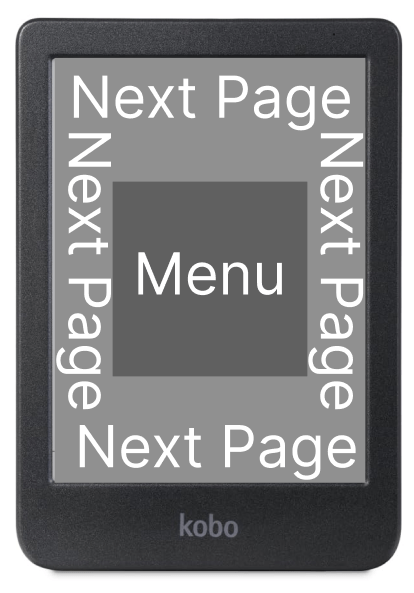
With this layout, you can change hands any time you like. “Menu” becomes just something you tap somewhere in the middle of the screen. You can hold your device at any angle and so long as your finger is near the edge, it’ll work.
“Previous page” would be relegated to a swipe backwards, which would be the only gesture needed.
I wonder if I can hack the thing to make it do this.

Leave a comment